Aliases
An alias is an additional email address. Emails to an alias arrive in your normal inbox. Aliases help you to keep your main address private and to see who passed on your address.
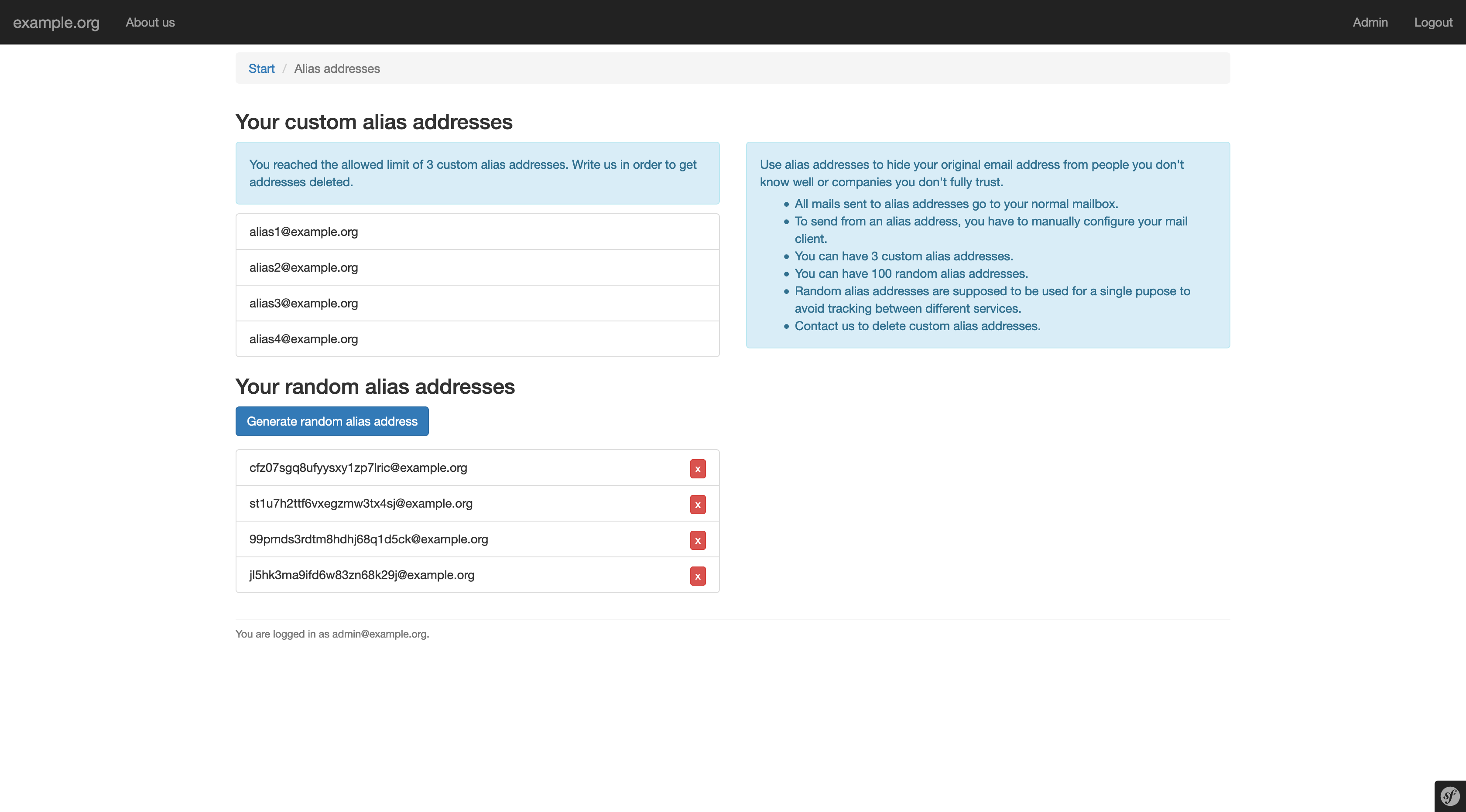
Go to Aliases in the navigation. All aliases use the same domain as your account.
Custom aliases
Custom aliases have a name you choose, for example newsletter@example.org.
- You can create up to 3 custom aliases.
- Allowed are lowercase letters, digits and
-,_and.. - The name must not be in use or reserved.
- Custom aliases can't be deleted by you. Choose carefully. If you need one removed, contact your provider.
To create one, enter the name under Create new custom alias and click Add.
Random aliases
Random aliases have a generated name of 24 letters and digits, for example
k3j9x0q2m7...@example.org. They are ideal for online shops, newsletters and
sign-ups.
- You can have up to 100 random aliases.
- Add an optional note (up to 40 characters) to remember what you used the alias for.
- Delete a random alias at any time with Delete alias. After that, emails to this address are no longer delivered. A deleted address can't be used again.
To create one, optionally enter a note and click Generate random alias address.
Good to know
- You receive an email whenever a new alias is created for your account.
- To send emails from an alias, set it up as an additional identity in your email program or webmail. Most providers allow sending from your own aliases.
- To let others find your OpenPGP key for a custom alias, see OpenPGP keys.